TL;DR
Safari and Firefox block third-party cookies by default. Safari also caps cookies at 7 days when they come from a third-party IP, which means your clients are losing conversions their ads genuinely drove. Server-side tracking routes events through a container you control on a first-party domain. Stape hosts that container for a fraction of what self-hosting costs. Twelve steps, mostly no-code. It does not bypass consent.
1. The 2026 reality: your client reports are already wrong
Third-party cookies did not die on schedule. They died unevenly, which is worse.
Safari and Firefox have blocked them by default for years. Chrome was meant to follow, then in April 2025 Google reversed course and kept them. Your clients’ Safari and Firefox traffic is now effectively cookieless; their Chrome traffic works only where consent is granted, and nothing is consistent between accounts.
Safari’s Intelligent Tracking Prevention breaks attribution even for visitors who did consent. Since 2022, it caps cookie lifetimes at 7 days for responses from a third-party IP. The exemption depends not on how the cookie was set, but on whose IP set it.
For the accounts you manage:
- Conversions your ads drove report as zero. The sale happened. The attribution did not.
- ROAS looks worse than it is and you defend the number.
- “Direct” quietly inflates, until the client’s leadership decides paid media isn’t working.
Worse, Smart Bidding and Meta’s algorithm optimize on that partial data, a problem growing as AI-driven campaign types hand more execution to algorithms only as good as the signal you feed them.
Stape fixes the collection layer.
2. What is server-side GTM tracking?
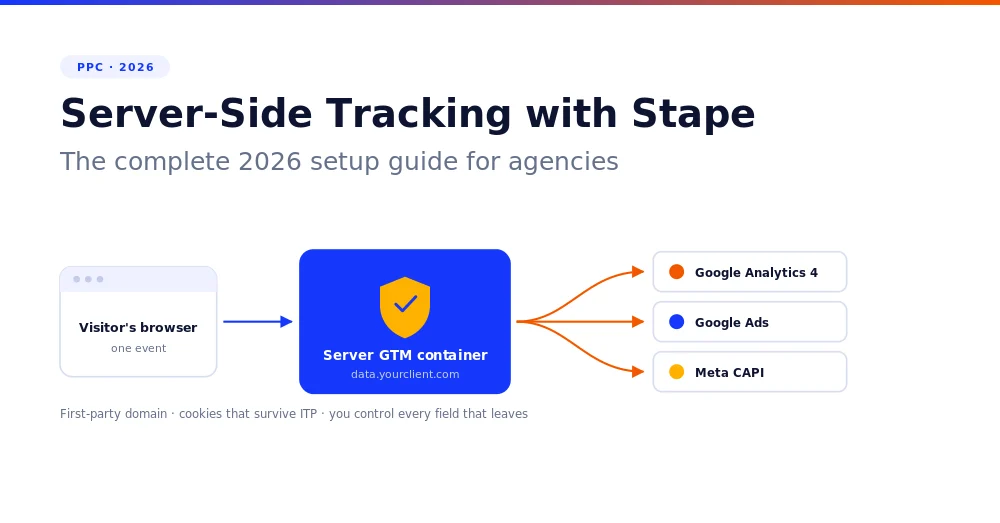
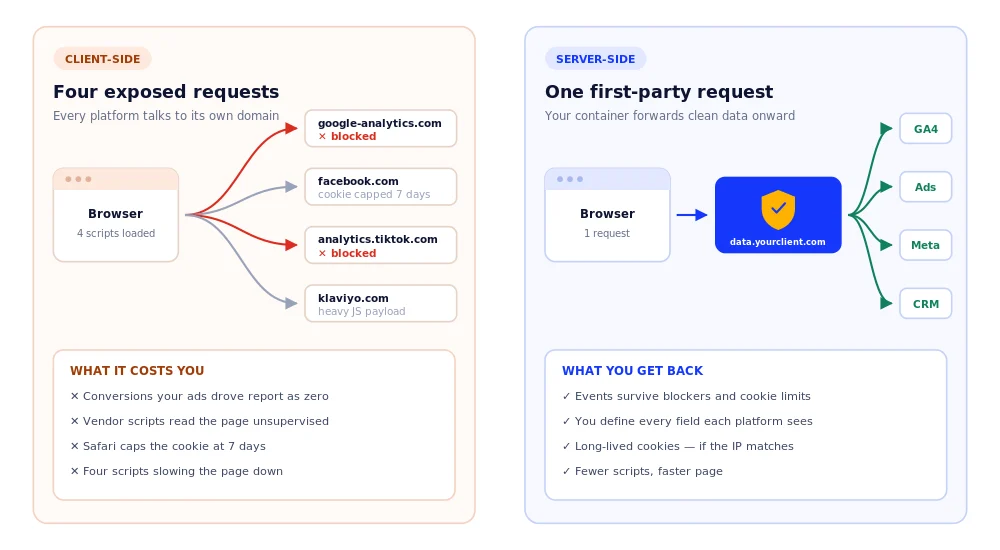
Server-side tracking sends events from the browser to a server container you control instead of straight to Google, Meta, or TikTok. That container decides what to forward to each platform. Because requests come from your client’s own first-party domain, they survive the cookie limits and ad blockers that break client-side tracking.
Today, a client site loads GTM( Google Tag Manager), which loads a GA4 script, a Meta pixel, and a Klaviyo script, each firing to its own third-party domain, separately blockable.
Server-side, the browser sends one event to something like data.yourclient.com, and that container forwards clean data onward. You control every field that leaves.
NOTE: This does not remove the browser container. You keep a web GTM container that captures the event and passes it on. Meta and TikTok still need a client-side event to initiate tracking.
3. Why server-side tracking matters in 2026
Four reasons, in the order that lands with a client.
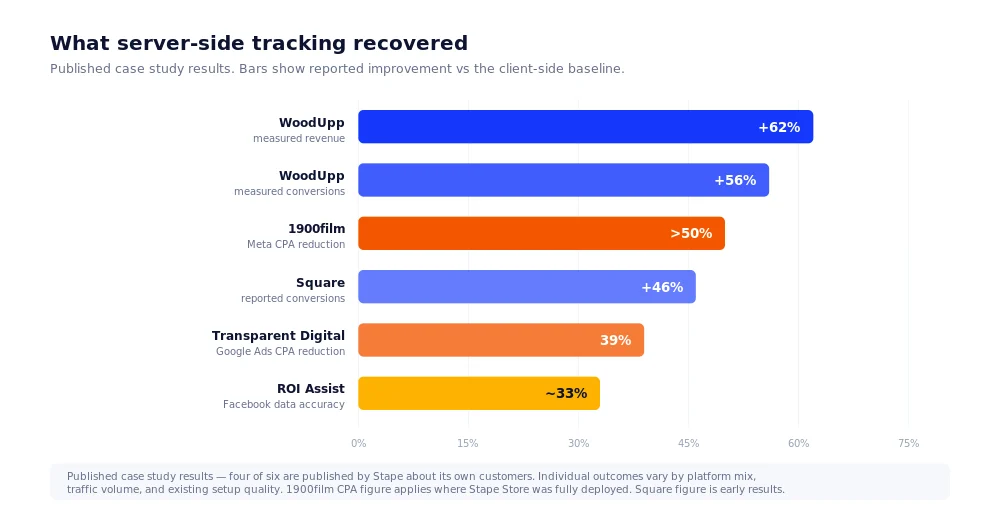
Better signal to ad platforms. Meta scores how well it matches events to real people. 1900film, a Japanese performance agency, hit an average Event Match Quality of 9 across its CAPI setups and, where Stape Store was fully deployed, cut Meta CPA by over 50%.
Conversion recovery. Data lost to ITP, ad blockers, and broken scripts gets recaptured. WoodUpp measured 62% more revenue and 56% more conversions than client-side over a six-month test.
Cleaner attribution. Surviving first-party cookies means GA4 keeps the campaign source instead of dumping the session into Direct.
Page speed. Google documented Nemlig improving page load time by 7% by moving tags to the server.
Raise the caveat before their legal team does: server-side tracking does not bypass consent. Opted-out users stay opted out wherever the tag fires. What you gain is control over what leaves, and good consent management recovers people who said yes but were dropped anyway.
Not sure how much your clients are losing? Book a GA4 tracking audit with E2M →
4. What is Stape, and why not self-host?
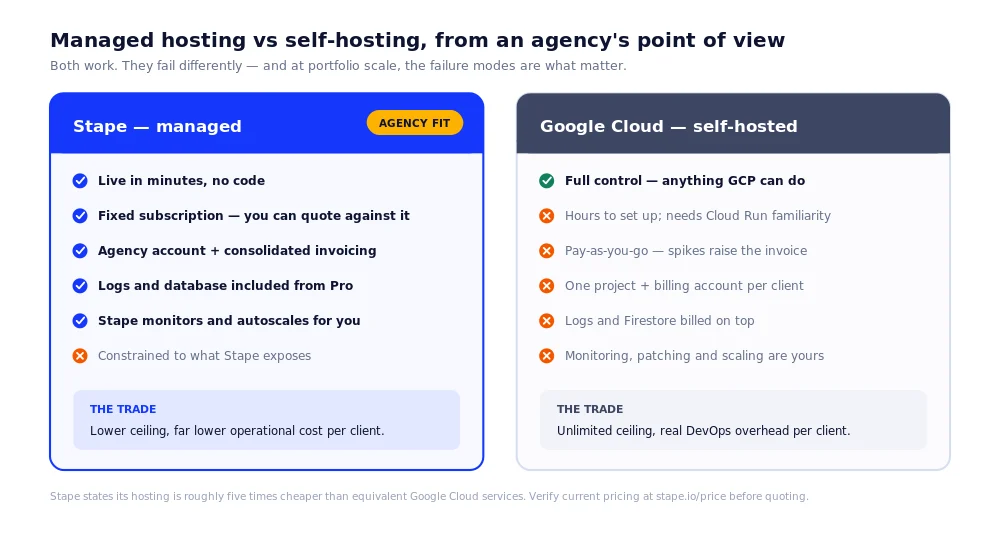
Stape is managed hosting for server-side GTM containers. You paste a container config, choose a region, and it deploys in about five minutes. Stape states its hosting is roughly five times cheaper than equivalent Google Cloud, with a free tier and no credit card to start.
You can self-host on Google Cloud instead. For an agency running a portfolio, three differences decide it:
| Stape | Google Cloud | |
|---|---|---|
| Pricing | Fixed subscription you can quote against | Pay-as-you-go; spikes raise the bill |
| Multi-client billing | Agency account, consolidated invoicing | One project and billing account per client |
| DevOps | Stape monitors and autoscales | Yours to patch, monitor, and scale |
GCP wins on control. Stape wins on everything that matters at twenty accounts rather than one and describes itself as the largest contributor to the server-side tag library, with over 80 tags across Google Ads, Meta, Klaviyo, TikTok, and Reddit.
IMPORTANT: check the plan gates before you quote. Logs (how you debug) start on Pro. Monitoring (how you learn a client’s tracking broke) starts on Business. Free is proof of concept, not delivery.
5. How to set up server-side GTM tracking with Stape
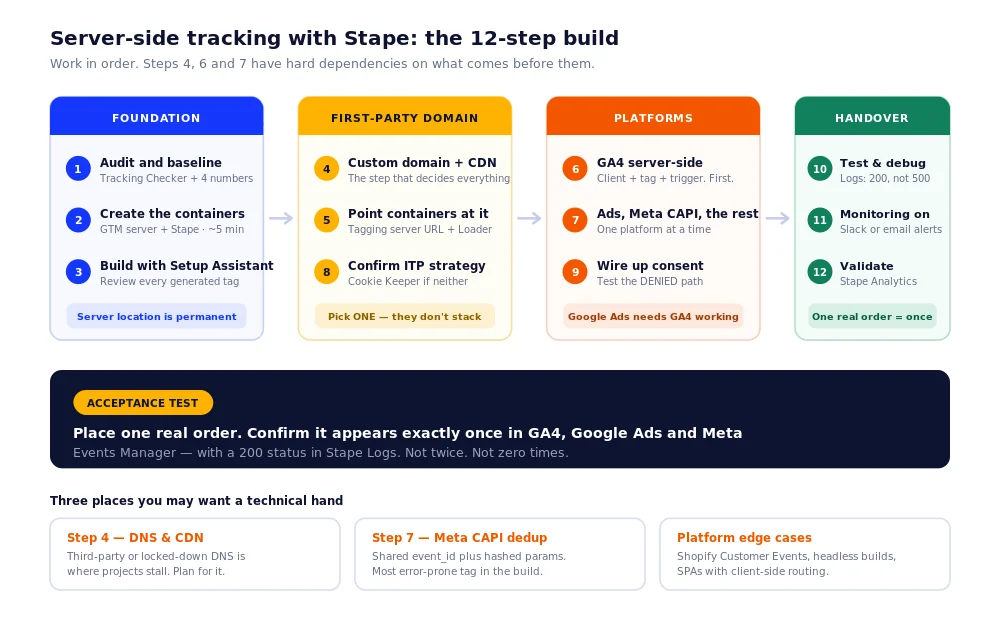
Twelve steps, mostly no-code. Work in order; steps 4, 6, and 7 depend on what precedes them.
- Audit and baseline. Run Stape’s free Website Tracking Checker, then compare GA4, Google Ads, and Meta conversions against actual orders. That gap is your business case.
- Create the containers. In GTM: new container, platform Server, copy the config. Paste into Stape and pick a region permanently, so choose EU for EU clients.
- Build with Setup Assistant. It generates platform templates. Review every tag before publishing.
- Add a first-party custom domain. Use a neutral subdomain like data. not metrics., analytics., or tracking., which blockers recognise. Verification takes 2–3 hours.
- Point the containers at it. Set the Tagging server URL, then update the GTM snippet or use Custom Loader to make scripts ad-blocker resistant.
- Configure GA4 server-side. Add a GA4 client, then a GA4 tag triggered on it. Fix broken client-side GA4 first; server-side forwards a broken schema faithfully.
- Add Google Ads, Meta CAPI, the rest. Google Ads works only through server GA4 requests, so step 6 must be live. Meta needs a shared event_id. One platform at a time.
- Extend cookie lifetime. Same-origin domain, Own CDN, or Cookie Keeper. These are alternatives, not a stack; pick one.
- Wire up consent. Gate server tags on consent state, and test the denied path, not just granted.
- Test and debug. Preview mode, the GTM Helper extension, and Stape Logs confirm events return 200, not 500.
- Turn on Monitoring. Email or Slack alerts when volume drops, or a platform rejects events.
- Validate in Stape Analytics. Check recovered volume, match rates, and EMQ against your baseline.
Acceptance test: place one real order. It must appear exactly once in GA4, Google Ads, and Meta.
Need a developer? Mostly no; three exceptions: DNS on a locked-down domain, Meta CAPI deduplication, and platform edge cases like Shopify.
Not sure how much your clients are losing? Book a GA4 tracking audit with E2M →
[D7] The 12-step build, mapped 07-twelve-step-process-map.svg
6. Common mistakes and how to avoid them
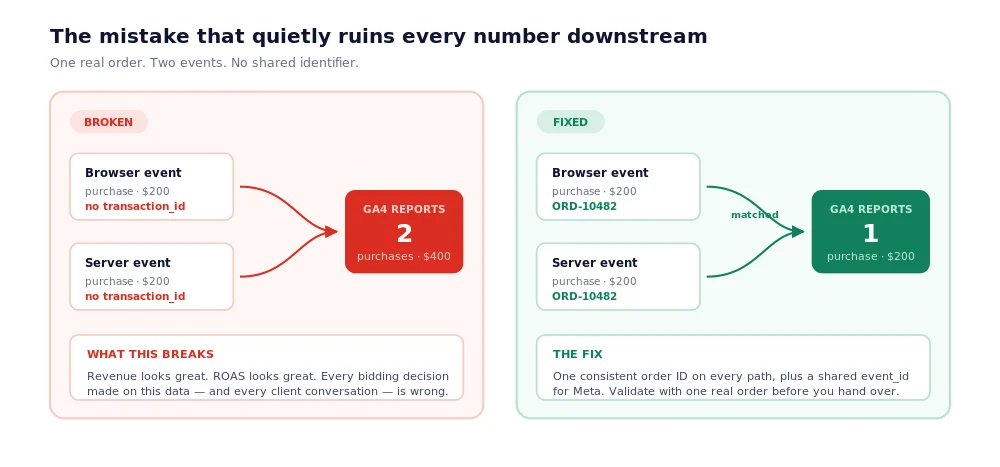
Double-counted purchases. Browser and server both fire a purchase with no shared identifier. Revenue looks great; every bidding decision is wrong. Fix: one transaction ID everywhere.
Assuming server-side means consent-free. It does not. The most expensive misunderstanding in the category.
Platform gotchas. Shopify’s Customer Events sandbox can produce iframe URLs in GA4 and drop add-to-cart events. Use Stape’s platform apps and confirm the GA4 eCommerce setup first.
Treating it as set-and-forget. Containers break silently on API updates and site deploys. Without monitoring, the client finds out before you do.
Going server-only. Meta and TikTok still need a browser event. Web plus server, deduplicated, is correct.
[D5] Double-counting: broken vs fixed 05-double-counting.svg
7. Google Tag Gateway vs server-side GTM
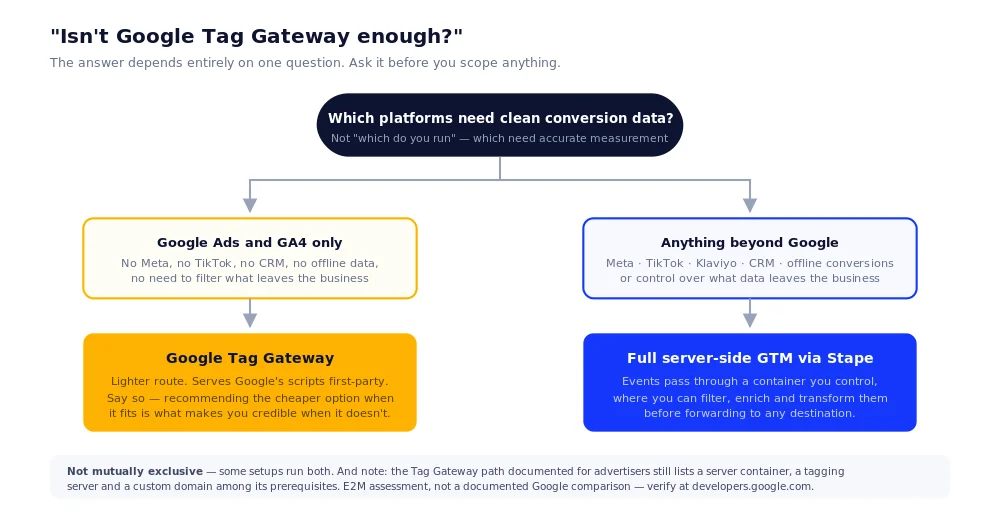
Google Tag Gateway loads Google’s measurement scripts from your first-party domain, fixing where the request comes from. Server-side GTM routes events through a container you control, where you can filter, enrich, and forward them anywhere. Tag Gateway fixes delivery; sGTM fixes delivery and gives you control of the data.
One clarification trips people up: the Tag Gateway path documented for advertisers still lists a server container, a tagging server, and a custom domain among its prerequisites. It is not a shortcut around server-side infrastructure.
Our recommendation: if a client runs only Google Ads and GA4, Tag Gateway is lighter; say so. The moment Meta, TikTok, or offline conversions appear, full sGTM is the call.
8. FAQs
No. If a user opts out, no tags should fire and no cookies should be set, regardless of where the tag executes. Consent state must reach the server container and be respected there. What server-side does provide is control over which data fields leave your infrastructure.
Usually yes. Moving tags off the browser removes third-party JavaScript the visitor no longer downloads. Google documented Nemlig improving page load time by 7% after moving tags server-side. In eCommerce, the biggest single gain often comes from replacing heavy scripts like Klaviyo’s.
Stape states its hosting is around five times cheaper, with fixed subscription pricing rather than usage-based billing. Logs and the Stape Store database are included from the Pro plan, where GCP bills for logging and Firestore separately. GCP is unpredictable at scale and needs ongoing DevOps.
Usually because attribution signals are lost before GA4 reads them. Cookie restrictions, ad blockers, and Safari’s 7-day cap on third-party-IP responses strip campaign data, and GA4 assigns those sessions to Direct. First-party server-side collection is the standard fix. Check UTM tagging too.
Yes, Stape offers a dedicated Shopify app. Shopify needs care, though: the Customer Events sandbox can produce iframe URLs in GA4 and drop add-to-cart events if the setup is not built for it. Use the platform-specific app and validate purchase events explicitly.
Ready to run this for your clients?
Every account in your book has a measurable tracking gap, and almost none of your clients know the number. E2M’s white label GA4 and GTM team builds and maintains server-side tracking under your brand containers, DNS, GA4 and Google Ads config, Meta CAPI deduplication, consent, monitoring, and reporting.
Your client sees your work. You own the relationship and the revenue.
Book a Growth Call → no pitch, just a conversation about your accounts.
New to the model? See our guide to white label PPC services.
Final thoughts
Server-side tracking stopped being optional the moment a meaningful share of your clients’ visitors went cookieless. The choice is not between accurate data and server-side tracking; it is between server-side tracking and optimizing against numbers you know are wrong.
Stape is the fastest credible route for most agencies. But treat it as a maintained system, not a one-time install: containers break quietly, and drifted tracking is worse than none because everyone trusts it.
Start here: audit your two largest clients’ accounts, fix double-counting, then expand platforms. Cleaner data, recovered conversions, and a ROAS number you can defend.
Not sure how much your clients are losing? Book a GA4 tracking audit with E2M →
Not sure how much your clients are losing?
 Book a GA4 tracking audit with E2M
 No pitch, just a conversation about your accounts.